
Free meeting copilot with no minute limits: how Roofle works
Roofle is a free, open-source meeting copilot for macOS with no paywall and no per-minute meter. How it works, what "free" covers, and what it doesn't.
By Priyanshu Shekhar, Founder of Roofle · · 6 min read
Roofle is a free, open-source (MIT) meeting copilot for macOS with no paywall and no per-minute meter. It transcribes calls on your Mac, writes live notes, and suggests follow-up questions using your own LLM API key or a local model. No bot joins the call. Windows support is planned but not available yet.
Last updated 25 November 2026. Covers Roofle v2.0.0 (Apple Silicon build).
Why most meeting copilots cap your minutes
Most hosted meeting note-takers cap minutes because every minute you record costs the vendor money. Your audio goes to their servers, their servers run transcription and summarisation, and that compute is billed per minute. A free tier with a monthly cap is how they limit that bill.
A real example: Otter.ai's free Basic plan gives 300 transcription minutes a month and a 30-minute limit per conversation. Otter cut the free allowance to 300 minutes in 2022. Plans change, so check Otter's own pricing page for current terms.
The cap shows up at the worst time. You hit it mid-month, a call isn't captured, and you find out when you need the notes.
If you are searching for a free meeting copilot with no minute limits, the useful question is not "which app says unlimited?" It is: who pays for the compute, and where does it run?
Why Roofle has no minute meter
Roofle runs on your Mac, so there is no hosted transcription service for it to meter. Speech-to-text runs on-device, and transcripts are stored on your Mac. Roofle captures your microphone and your system audio, so it works with any call app on the machine.
Roofle uses Whisper for speech-to-text. Whisper is an open-source model from OpenAI, released in September 2022 under the MIT license, and it can run entirely on your own machine at no cost. The app itself is built with Tauri, a framework for small, fast desktop apps with a web front end and a Rust backend.
The code is MIT-licensed and public on GitHub. Roofle is free, and you can read the source to confirm how it works.
I built Roofle as a solo side project, not a company with a usage bill to cover. That is why the pricing question has a short answer: it is free.
What "free" does and doesn't cover
Roofle costs nothing to download or use, but the AI notes and questions need a language model, and that model has to come from somewhere. You have two options:
• Your own API key. You pay your LLM provider directly, at their rates, for the text you choose to send. Roofle doesn't add a markup or a meter.
• A local LLM. Nothing leaves your Mac and there is no per-token bill. Your Mac does the work, so expect more load on the machine during a call.
Two more honest limits. Roofle is macOS only for now, as an Apple Silicon build. And running transcription on-device uses your Mac's CPU and battery, so long calls cost some of both.
So "no minute limits" is accurate for Roofle itself. "No cost" is only true if you run a local model.
What you get besides a transcript
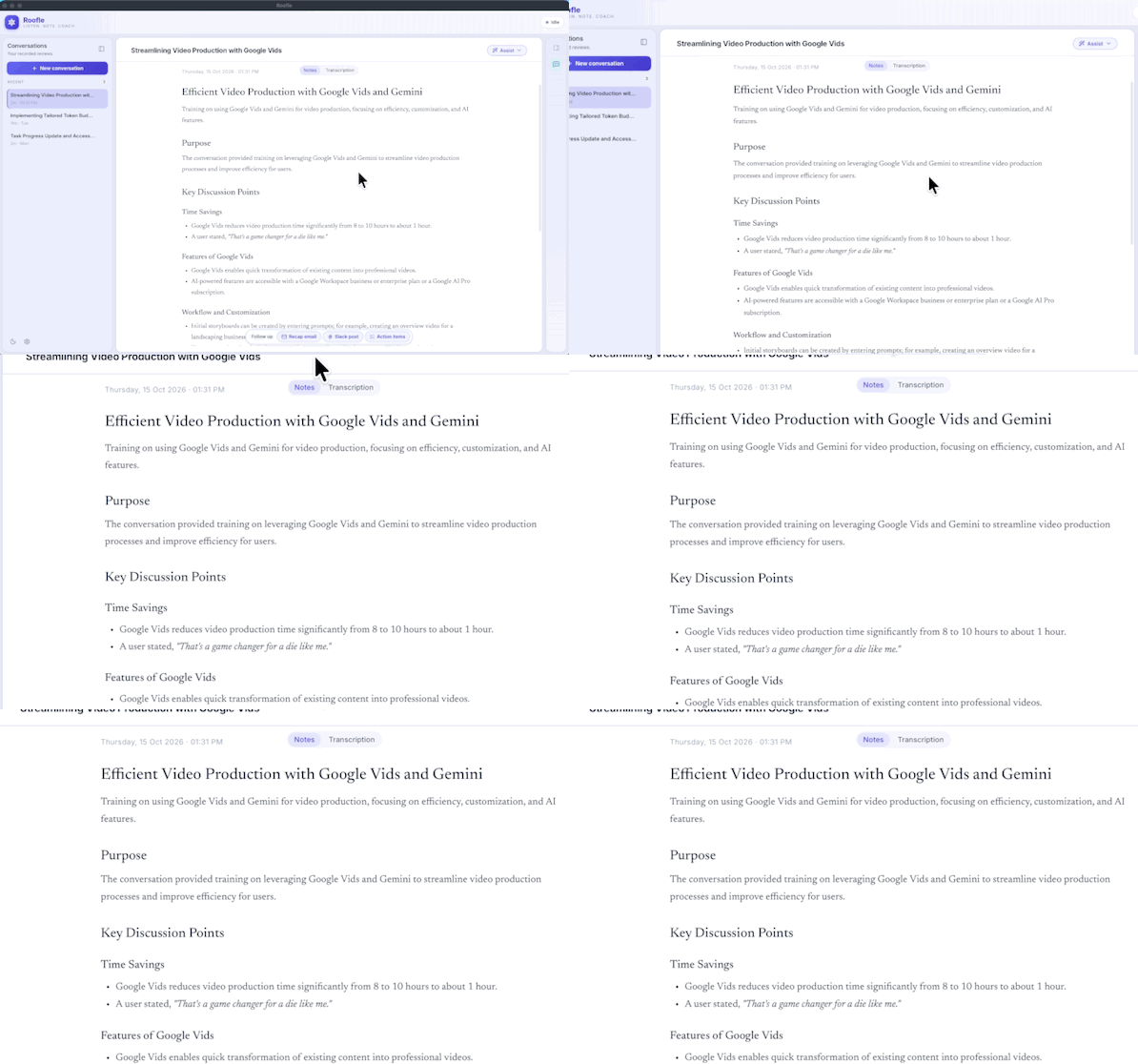
Roofle is a copilot, not only a recorder. During a call it does three things:
• Live notes. Notes build as the conversation happens, so you can stay in the call instead of typing.
• Suggested follow-up questions. Roofle listens for gaps and suggests what to ask next. In a discovery call, that can be budget, timeline or decision-makers.
• Action items. One click after the call turns the conversation into a list of next steps.
You pick a role first: Sales, Recruiter, Product Manager, Founder, Customer Success or Software Professional. The role changes what Roofle listens for and what it suggests. It launches from the menu bar and keeps out of the way.
Who Roofle is for, and who it isn't
Best for: solo founders, PMs, recruiters, salespeople and customer success folks on a Mac who want private notes, no bot in the call, and no monthly minute allowance to watch.
Not a fit if: you need Windows today, a hosted team workspace with shared notes, or a CRM sync. Roofle is a v1 side project and doesn't claim any of those.
How it differs from a typical hosted, capped note-taker:
| Roofle | Typical hosted note-taker with a free tier | |
|---|---|---|
| Minute limit | None set by Roofle | Monthly cap on the free plan |
| Where transcription runs | On your Mac | Vendor's servers |
| Where transcripts are stored | On your Mac | Vendor's cloud |
| Bot joins the call | No | Often yes |
| LLM | Your key or a local model | Vendor's choice |
| License | MIT, open source | Proprietary |
| Platform | macOS now, Windows planned | Varies |
Install Roofle in three steps
1. Download the .dmg from roofle.app and drag Roofle to Applications. Or install the Homebrew cask.
2. Open Roofle from the menu bar and pick your role.
3. Add your LLM API key, or point Roofle at a local model, then start a call.
macOS will ask for microphone and audio-capture permission the first time. That is how Roofle hears both sides of a call without a bot. The current build is for Apple Silicon (v1.0.0).
Frequently asked questions
Is Roofle really free? Yes. Roofle is free and open source under the MIT license. The only cost you might pay is your LLM provider's fees if you use your own API key.
Does Roofle have a minute limit? Roofle doesn't set one. Transcription runs on your Mac, so there is no hosted service counting your minutes. If you use a cloud LLM, your provider bills you for the text you send.
Does a bot join my calls? No. Roofle captures your microphone and system audio on your Mac, so other participants don't see an extra attendee.
Where does my audio go? Nowhere. Speech-to-text runs on your Mac, and transcripts are stored there.
What data leaves my Mac? Only the text you choose to send to your chosen LLM. With a local LLM, nothing leaves.
Which call apps does it work with? Any call app on your Mac, because Roofle captures audio at the system level.
Does it work on Windows? Not yet. Windows support is planned.
Can I use a local model like Ollama? Yes, Roofle supports a local LLM. Check the GitHub repo for the models and setup it currently documents.
Do I need to tell people I'm transcribing the call? Often, yes. Recording and transcription consent rules vary by country and state, so check the rules where you and your participants are, and tell people up front. Roofle doesn't change your legal obligations.
For scale: Rev's state-by-state guide puts most states, plus D.C., at one-party consent and 11 states at all-party consent. Federal law requires the consent of at least one party, and states can be stricter. This is general information, not legal advice.
Sources
Checked 25 November 2026.
• Is Otter.ai Free? Basic Plan Limits and Upgrade Costs, Dupple
• Otter.ai slashes free monthly transcription minutes to 300, TechCrunch
• Whisper, Real Python
• How to Transcribe Audio Free With Whisper, AI Weekly
• What is Tauri?, Tauri documentation
• Phone Call Recording Laws, Rev
• Reporter's Recording Guide, Reporters Committee for Freedom of the Press
From the maker
I'm building Roofle on my own, in my spare time. It's early, and it will have rough edges. If something breaks or you want a feature, open an issue on GitHub or write to support@roofle.app. Stars, bug reports and pull requests all help.
• Site: roofle.app
• Source: github.com/roofle-ai/roofle
• License: MIT