
You don't need the best meeting recording API
Want notes from your own calls? Skip the meeting bot API. Capture audio on your Mac and transcribe locally with Whisper. What it costs, what you give up, and when an API is still right.
By Priyanshu Shekhar, Founder of Roofle · · 7 min read
If you are building a meeting note-taker for yourself, you probably don't need a meeting recording API at all. On a Mac, you can capture your microphone and system audio locally, convert speech to text on-device with an open-source model like Whisper, and keep the audio on your machine. Roofle, a free open-source (MIT) Mac meeting copilot, is built around this idea.
Last updated 27 November 2026. Covers Roofle v2.0.0 (Apple Silicon build).
The question behind the question
Search for "best meeting recording API" and you get a list of services that send a bot into your Zoom, Google Meet or Teams call. That is the right answer to one question: *how do I record meetings for thousands of other people's accounts?*
It is the wrong answer to a different question: *how do I get a transcript of my own calls?*
If you are a solo developer, a PM, a founder or a QA engineer who wants notes from your own meetings, the second question is yours. For that, you can skip the API, skip the bot and skip the per-hour bill.
What a meeting recording API actually sells you
A meeting bot API such as Recall.ai gives developers a bot that joins calls on Zoom, Google Meet, Microsoft Teams, Webex, GoTo Meeting and Slack, and returns audio, video and metadata. That is real engineering work saved, if your product has to join other people's meetings at scale.
It also comes with costs you may not want:
• Per-hour pricing. Recall.ai's pricing page lists pay-as-you-go at $0.50 per hour of recording. Its own pricing post says its built-in transcription engine is an extra $0.15 per hour. Those are cheap numbers for a company with customers. They are not free, and they grow with every call.
• A bot in the room. The Meeting Bot API requires a bot to join online calls, and some participants dislike that. A third-party list of pros and cons makes the same point.
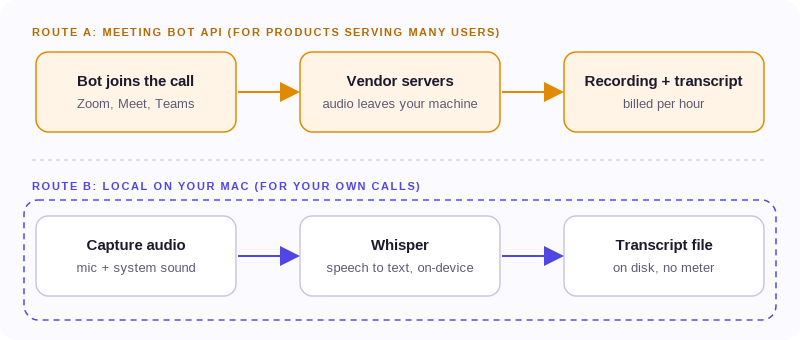
• Your audio leaves your machine. The recording and transcript pass through a vendor.
Prices change. Check the vendor's page before you quote any of these figures.
The local alternative: capture, transcribe, done
A personal meeting tool needs only three things.
1. Capture audio on your own Mac
Apple's ScreenCaptureKit framework is built for high-performance capture on macOS. Rust bindings for it describe system audio and microphone capture: system audio from macOS 13, and microphone from macOS 15. Because the audio comes from your Mac and not from a meeting platform, it works with any call app. macOS asks for permission first, and screen capture always requires user permission.
2. Convert speech to text with Whisper
Whisper is an open-source speech recognition model from OpenAI. It was first released in September 2022), and its code and model weights are released under the MIT License. It was trained on 680,000 hours of multilingual and multitask data and supports 99 languages.
A small correction to how this is often described: Whisper is a speech-to-text model, not a large language model in the chatbot sense. It turns audio into words. It doesn't summarise or answer questions. That split is useful, because you can run the speech part locally and decide separately what, if anything, goes to an LLM.
The official Python package runs locally on CPU or GPU. For a desktop app, whisper.cpp is the more practical route. It is an MIT-licensed C/C++ port that runs fully offline. Its README says that on Apple Silicon the inference runs fully on the GPU via Metal. It also supports Core ML, which the README says can give more than 3x speed-up over CPU-only. The weights are downloaded once, and later runs need no network.
3. Store the result where you control it
Write the transcript to a file on disk. No upload, no retention policy to read, no per-hour meter running.
What local costs you
Honest trade-offs, because "free" is not the same as "no downside":
• No speaker labels from Whisper itself. Whisper does not output speaker labels. You can separate "you" from "them" by capturing microphone and system audio as two streams, but telling apart several remote people needs extra work.
• Language quality varies. Whisper does well on Romance languages, German and Japanese. In one evaluation, 50 of 82 languages had word error rates above 20%. If your calls are in a less-resourced language, test before you commit.
• Your Mac does the work. Larger models are more accurate and slower. You pick the trade-off, and it depends on your hardware.
• You maintain it. Permissions, audio devices and model updates become your problem. A vendor API takes that off you.
• Real-time takes engineering. Live transcription is not a switch you flip. whisper.cpp includes a sample of real-time transcription from the microphone, but turning that into a reliable app is real work.
When you should still use a recording API
Use one if:
• you are building a product that must join meetings on behalf of many users' accounts;
• you need video, or per-participant audio streams;
• you need the same behaviour on every platform, including web and mobile, from day one;
• you need compliance paperwork and support from a vendor.
Use the local route if you want notes from your own calls, you care where the audio goes, and you can accept a Mac-only tool.
Where Roofle fits
I built Roofle because I wanted notes from my own meetings without a bot in the call and without a meter running. It is a free, open-source (MIT) meeting copilot for macOS. It captures your microphone and system audio, so it works with any call app. Speech-to-text runs on-device with Whisper, and transcripts are stored on your Mac. Only text you choose to send goes to your LLM. You can bring your own API key or use a local model.
On top of the transcript, Roofle writes live notes, suggests follow-up questions during the call and turns the call into action items afterwards. You choose a role such as Sales, Product Manager, Founder or Software Professional, and that changes what it listens for.
Best for: founders, PMs, sales people, QA engineers and developers on a Mac who want private notes from their own calls.
Not a fit if: you need Windows today (it is planned, not available), a hosted team workspace, a CRM sync, or a bot that joins meetings for you.
Try the local route yourself
1. Install Roofle (Apple Silicon .dmg, or the Homebrew cask) and open it from the menu bar.
2. Allow microphone and audio-capture permission when macOS asks.
3. Pick a role, add your LLM key or point it at a local model, and start your next call.
If you would rather build your own, start from whisper.cpp and Apple's ScreenCaptureKit, and read Roofle's source on GitHub as one example.
Frequently asked questions
Do I need a meeting recording API to transcribe my own calls? No. On a Mac you can capture your own microphone and system audio and transcribe locally with Whisper. A recording API is for products that join meetings for many users.
Is Whisper really free? Yes. Whisper's code and weights are MIT-licensed. Running it locally has no per-minute fee, though it uses your Mac's resources.
Is Whisper a large language model? No. It is a speech recognition model. It converts audio to text. Summaries and suggested questions need a separate LLM.
Does Whisper label who is speaking? Not by itself. Capturing your microphone and the system audio separately helps you tell yourself from everyone else.
Does local transcription work offline? After the model weights are downloaded, whisper.cpp runs offline. Any LLM step is separate, and it is offline only if you use a local model.
Does a bot join my call with Roofle? No. Roofle captures audio on your Mac.
What leaves my Mac when I use Roofle? Transcription and transcript storage are on your Mac. Only text you choose to send goes to your chosen LLM. With a local LLM, nothing leaves your machine.
Does Roofle work on Windows? Not yet. Windows support is planned.
Is it OK to record my calls? Rules differ by country and state, and by company policy. Tell participants you are transcribing, and check the rules that apply to you.
Sources
Checked 27 November 2026.
• Recall.ai pricing and new pricing for 2026, Recall.ai
• Meeting Bot API, Recall.ai
• Recall.ai pros and cons, Joinsecret
• openai/whisper, GitHub
• Whisper (speech recognition system)), Wikipedia
• How to run OpenAI's Whisper, AssemblyAI, April 2026
• How to transcribe audio free with Whisper, AI Weekly
• Whisper reference, Real Python
• ggml-org/whisper.cpp, GitHub
• whisper.cpp overview, x-cmd
• ScreenCaptureKit, Apple Developer
• screencapturekit Rust crate, docs.rs
From the maker
I'm building Roofle on my own, in my spare time. It is early and has rough edges. If something here is wrong or your setup differs, open an issue on GitHub or write to support@roofle.app.
• Site: roofle.app
• Source: github.com/roofle-ai/roofle
• License: MIT